Registering for a group class
Grab a place in a class, workshop or group session.
Some businesses offer group classes — yoga, pilates, workshops — where several people join the same session. Instead of picking a free time, you choose one of the scheduled sessions.
How to register
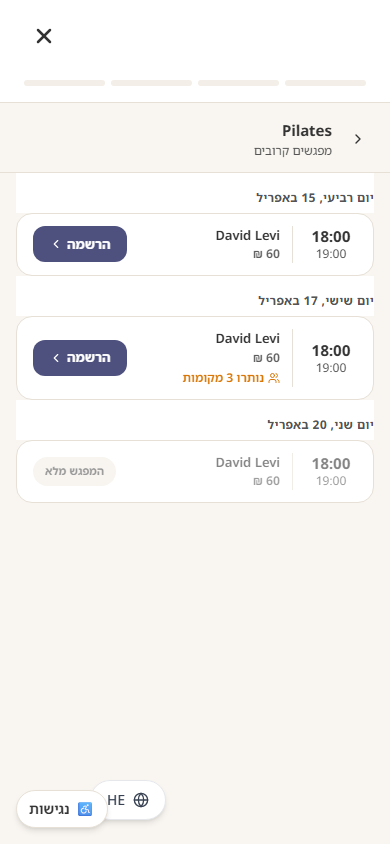
- 1Open the business's booking page and choose the class.
- 2Pick a session from the list — you'll see the date, time, instructor, price, where it takes place and how many places are left.
- 3Tap Register. If you're not signed in yet, verify your phone with a one-time code.
- 4You'll see an on-screen confirmation with the session details and the full location.
Where the class takes place
A class is not always at the business address — it might be in a park, at a studio, or online. The location is shown next to each session when you choose one, and in full on your confirmation and in My Bookings, with a link to open it in Maps. For an online class you get a link to join; if the business has not added it yet, they will send it before the class starts.
Full sessions and cancellations
- A session with no places left shows "Fully booked" — check other dates of the same class.
- You can only hold one place per session.
- Your registrations appear in the "Classes" tab under My Bookings.
- You can cancel there until the session starts (some businesses set an earlier cancellation deadline). Your place is freed for someone else immediately.
Class registrations send no automatic messages at the moment. If the business cancels or moves a session, they will contact you directly — make sure the phone number you registered with is correct.
Still need help?
support@sagarnu.co