Cancelling or changing your appointment
Cancel an appointment yourself, or ask the business to move it.
Plans change. You can cancel your appointment yourself through the link in your confirmation message. To move it to a different time, contact the business — they reschedule it from their calendar.
How to cancel
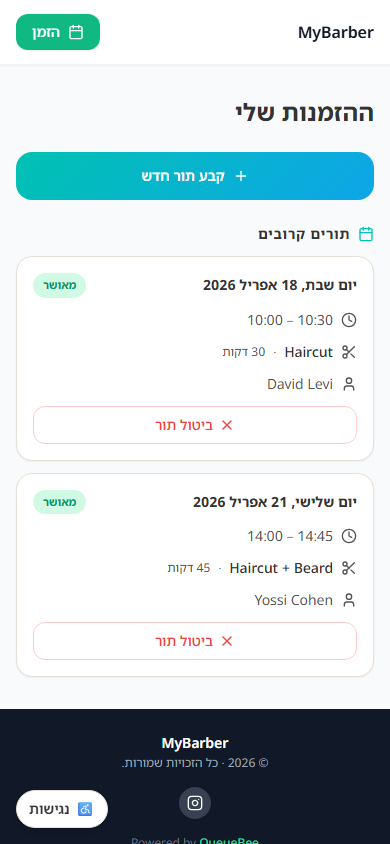
- 1Open the booking confirmation message you received (WhatsApp or SMS). A reminder carries the same link, except a same-day reminder sent by SMS.
- 2Tap the link — on WhatsApp it is the "View Appointment" button — to open your bookings page for that business.
- 3Sign in with your phone number using the one-time code you receive.
- 4Under "Upcoming", tap "Cancel appointment" and confirm — the slot is immediately released.
How to change the time
There is no self-service option to move an appointment. Contact the business by phone or WhatsApp and they will reschedule it from their calendar; depending on the business's settings you receive a message with the new time. You can also cancel the appointment yourself and book a new slot online.
If you can't find the link
Contact the business directly by phone or WhatsApp and they will handle the change for you.
If you need to cancel, do it as early as possible — it helps the business offer the slot to another client.
Still need help?
support@sagarnu.co